A product link is the beginning.
A complete first-order guide covering exact options, two payments, QC, returns, packaging and receipt.
Buying guide: find, check, order, receive
Follow the full purchase below, or go directly to the decision in front of you.
- Use the Spreadsheet to find an item, then check the product and seller.
- Plan the complete cost and check the agent’s suitability.
- Submit the original product link and pay.
- Review QC, request a missing detail and settle any return.
- Prepare the parcel, then track and inspect the delivery.
For an unclear version or grade, read the product-detail guide before choosing.
Hoobuy video guide
See Hoobuy’s own buying tutorial, then use the screenshots below to follow the order steps.
Open Hoobuy’s video guide ↗The tutorial opens on Hoobuy.

How to use Hoobuy
- Give Hoobuy the original product link and confirm the precise options.
- Make the first payment for the goods, domestic delivery and displayed purchase charges.
- Read messages about price, stock or choices while the order is processed.
- Inspect warehouse QC, request missing details and resolve returns before shipping.
- Choose accepted items, packaging, address and an eligible route.
- Pay the separate international parcel total.
- Follow tracking and check the received contents while the packaging is available.
How to choose a product
Open the original seller page from the product catalogue. Select the colour, size, model and quantity before comparing prices. Check if one unit means one piece, a pair or a set, and whether a low price is for a deposit or accessory.
Use recent buyer feedback and item-specific photos to assess the seller. For a preorder, ask about dispatch and cancellation. If an option is out of stock, decide whether to wait or choose an exact alternative.
Browse productsCompare the measurements that matter
Compare the chart with an item you own. On clothing, identify whether it gives body measurements or the finished garment’s flat width and length. A letter size alone is not enough across different sellers.
For a bag, check usable dimensions and included straps. For shoes, read the seller’s size guidance and ask about a relevant measurement. Save the chart or selected option so you can compare it with the warehouse item.
Read versions, grades and product claimsHow to choose a seller
Read recent buyer feedback for the item and version you intend to buy, not only the shop’s overall score. Look for usable photos and concrete notes about measurements, dispatch or missing accessories. The same marketing image can appear in shops selling different versions.
Ask about the exact size chart, included parts, stock and return terms before purchase. Save a clear answer alongside the original product link. For a preorder or discounted flawed item, make the dispatch and cancellation conditions part of the decision.
Compare version claimsOrder through Hoobuy
Paste the original item URL into Hoobuy’s search. Confirm the imported option, quantity and price, then add any precise purchase remark. If a valid item will not import, ask about a manual purchase request with a screenshot of the option.
The first payment covers the goods, domestic delivery and charges shown at checkout. International delivery is chosen and paid for later. Read purchase messages for price changes, unavailable stock and any question holding up the order.
Open Hoobuy Watch the official buying tutorial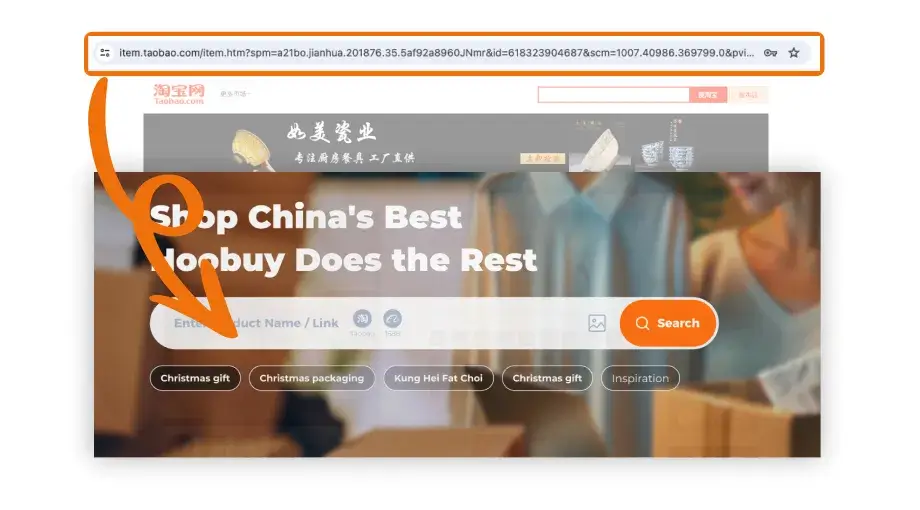
Paste the seller’s URL into the search field on Hoobuy.
Open full-size image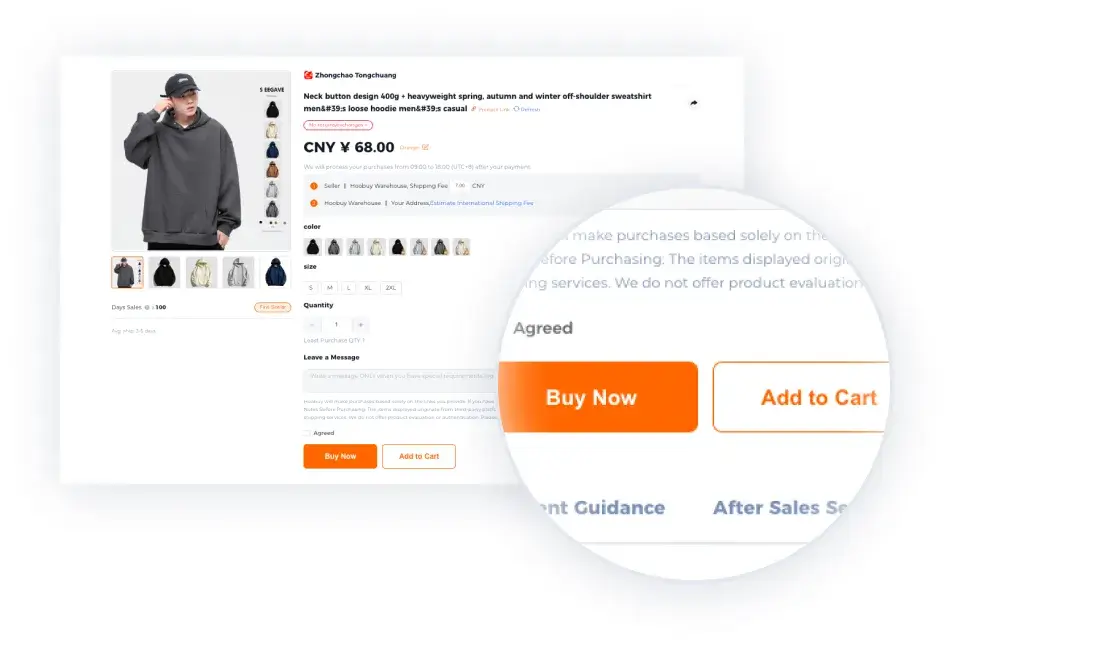
Check the imported colour, size and quantity, then use Buy Now or Add to Cart.
Open full-size image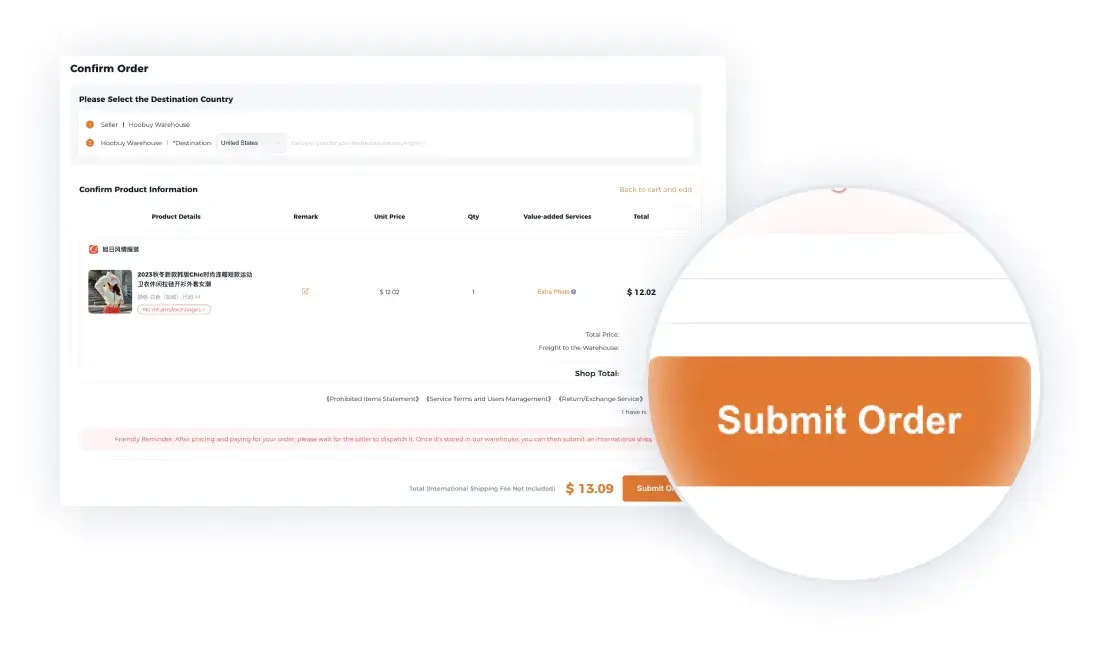
Read the destination, selected goods and purchase total before choosing Submit Order.
Open full-size imageOfficial tutorial examples. Sample prices and dates are illustrative; use the details shown in your current order.
What is QC?
QC means quality control. For an agent order, it usually refers to inspection and photographs of the item received at the warehouse. These views can show a wrong variant, a missing part or visible damage while you can still ask about a return in China.
Check the included photo views and the charge for any requested extra view or measurement. Photos show appearance from limited angles; they do not authenticate a product, test its composition or prove durability.
Use the QC checklistHow to check QC photos
Match the photos to the order and variant. Check the whole item, visible damage, size label and included parts. Use the photo to answer a specific question, such as whether a strap is included or the shoe sizes match.
If a detail is unclear, ask for an extra view or a measurement with the tape visible. QC photos show the received unit from limited angles; they do not establish authenticity or long-term durability.
“Please measure the shirt flat across the chest and show the tape from seam to seam. The seller’s chart lists 58 cm.”
Accept it, ask again or request a return
If the order is wrong or a visible defect matters to you, contact Hoobuy promptly with the order number, selected option and photo. Ask about return or exchange eligibility, deadline, postage and other charges before approving an action.
Keep disputed items out of an international parcel. Check the storage deadline on the items you are waiting to combine. For a cancellation, confirm where the refund goes and how any balance withdrawal works.
Get help with an unresolved itemHow Hoobuy shipping works
Select the accepted items, confirm the address, and decide which retail boxes or protection to keep. Compare routes using the same contents, packed dimensions and weight. Ask about batteries, liquids or unusual materials before purchasing them.
Read the route’s chargeable-weight formula, parcel limits, tracking and delivery estimate. A large box may cost more than its scale weight suggests. Compare any optional cover by what it includes and requires for a claim.
Review the final contents, services and payable amount before making the second payment. Provide accurate contents and value details requested by the shipping flow.
Check current shipping estimates Review the total costTrack it and check the delivery
A label can appear before carrier collection. Follow the parcel status and tracking scans; a destination carrier may use another number. For a stalled shipment, send support the parcel reference, last scan and date, and ask when an enquiry can be opened.
At delivery, compare the contents with the parcel list. Keep packaging and labels and take clear photos if something is damaged or missing. Contact support promptly for the applicable claim process.
Get purchase or delivery helpShopping precautions before paying and shipping
- Confirm the exact option and what one unit includes; a minimum price may describe a deposit or accessory.
- Ask about batteries, liquids and other route restrictions before buying.
- Save the size chart and seller’s answer so QC can be compared using the same measurement method.
- Keep funds for the international payment and watch return and storage deadlines.
- Resolve an item mismatch before packing. Keep labels and packaging until you have checked the delivery.